Stripe
Webround integrates Stripe to manage your store's payments. The platform utilizes the Stripe Connect integration, which has become the de-facto standard in the global software industry. Thanks to Stripe Connect, it is possible to seamlessly onboard merchants (sellers), who leverage Stripe as a payment gateway and Webround as the technological infrastructure for full sales session management.
What is Stripe
Stripe is universally recognized as the best payment gateway in the world. It provides the technical, banking, and fraud prevention infrastructure necessary to operate online at the highest levels. Featuring a checkout with the highest conversion rate on the market, Stripe is the leading partner for a multitude of software solutions aiming to simplify sales independently or via third-party platforms like Webround.
Stripe Connect Architecture
The integration of Stripe Connect for all Webround stores guarantees:
- Independence: Each store is an autonomous Stripe account, independent of all others.
- Fiscal Entity: Each store represents the unique fiscal entity that actually processes payments.
- Flow of Funds: Stripe receives payments on your behalf through its global infrastructure. Once collected, Stripe transfers the funds to your bank account according to the payout schedule set directly in your dashboard.
Standard Integration and Low Lock-in
To simplify integration and reduce the risk of lock-in (exclusive dependence on a provider), Webround adopts a Standard type integration:
- Awareness: Each user registers on Stripe consciously and maintains full legal and technical ownership.
- Independent Access: Webround stores a range of data to optimize performance, but every customer retains full and independent access to their own Stripe dashboard.
- Total Control: The user can manage events, webhooks, and API keys even outside of Webround, allowing for parallel integration with additional third-party or proprietary systems.
- Simplicity: Connecting to Stripe is a quick operation. Once identity documents are uploaded and the nature of the business is validated, you are ready to sell.
Stripe Functionalities
Through Stripe, Webround allows you to manage a professional sales ecosystem:
- Sale of physical products, digital products, and subscriptions.
- Management of renewals, cancellations, and terminations of recurring payments.
- Issuance of invoices and management of refunds.
- Tax compliance management via Stripe Tax, to sell globally in compliance with local regulations.
Stripe Tax
Webround integrates with Stripe Tax for tax automation. However, it is important to note that some advanced functions may not be compatible with Webround's standard flows. Specifically, the use of Stripe Tax might influence:
- Native Webround discount codes (while those created on Stripe remain valid).
- Quantity discounts managed by the platform.
Transparency on Costs and Fees
It is essential to distinguish between the costs of the Stripe gateway and those of the Webround platform:
- Stripe Pricing: The rates applied by Stripe are independent. Webround has no control over these rates, nor does it intervene in their management or billing.
- Webround Fees: Platform fees are applied exclusively when using the Checkout APIs. In this case, Webround integrates the fee calculation as established by the payment plan applied to the store.
Awareness, Risks, and Compliance
Selling online is a full-fledged commercial activity and involves risks that must be faced with extreme awareness.
Make sure to speak with a professional about your online projects and the correct fulfillment of fiscal and legal obligations in your country and your sales area.
Stripe's terms and conditions must be strictly respected. Failure to comply with these rules can lead to:
- Immediate ban of the account.
- Freezing of funds present on Stripe and not yet transferred to the merchant's bank account.
Healthy businesses, with demonstrable and transparent operations, usually do not encounter problems. Webround provides the technology, but operational responsibility and compliance with Stripe contracts rest entirely with the user.
How Webround can interact with your Stripe account
The technical implementation of the Stripe Connect Standard mode allows Webround to interact with the merchant's account to ensure the correct functioning of the store. Specifically, Webround can:
- Monitor logs and Stripe usage for the connected account.
- Operate on behalf of the connected account for activities such as:
- Creation and modification of products and prices.
- Initiation of Checkout sessions that can generate sales for your store.
- Customer records management.
- Management of recurring payment plans.
- Reception of events (webhooks) related to sales, returns, disputes, and subscriptions.
These permissions are fundamental to correctly integrate the Stripe Connect offer and ensure the automation of sales processes.
From a KYC (Know Your Customer) perspective, Webround does not assume direct responsibility, as the Stripe Connect Standard integration requires a fully independent merchant account connected to the platform. Webround does not collect nor require personal or payment information from the merchant, delegating this task to Stripe instead, which is an entity of proven reliability.
Integration Guide
Whether you already have a Stripe account or not, Webround provides a quick procedure for linking the two accounts.
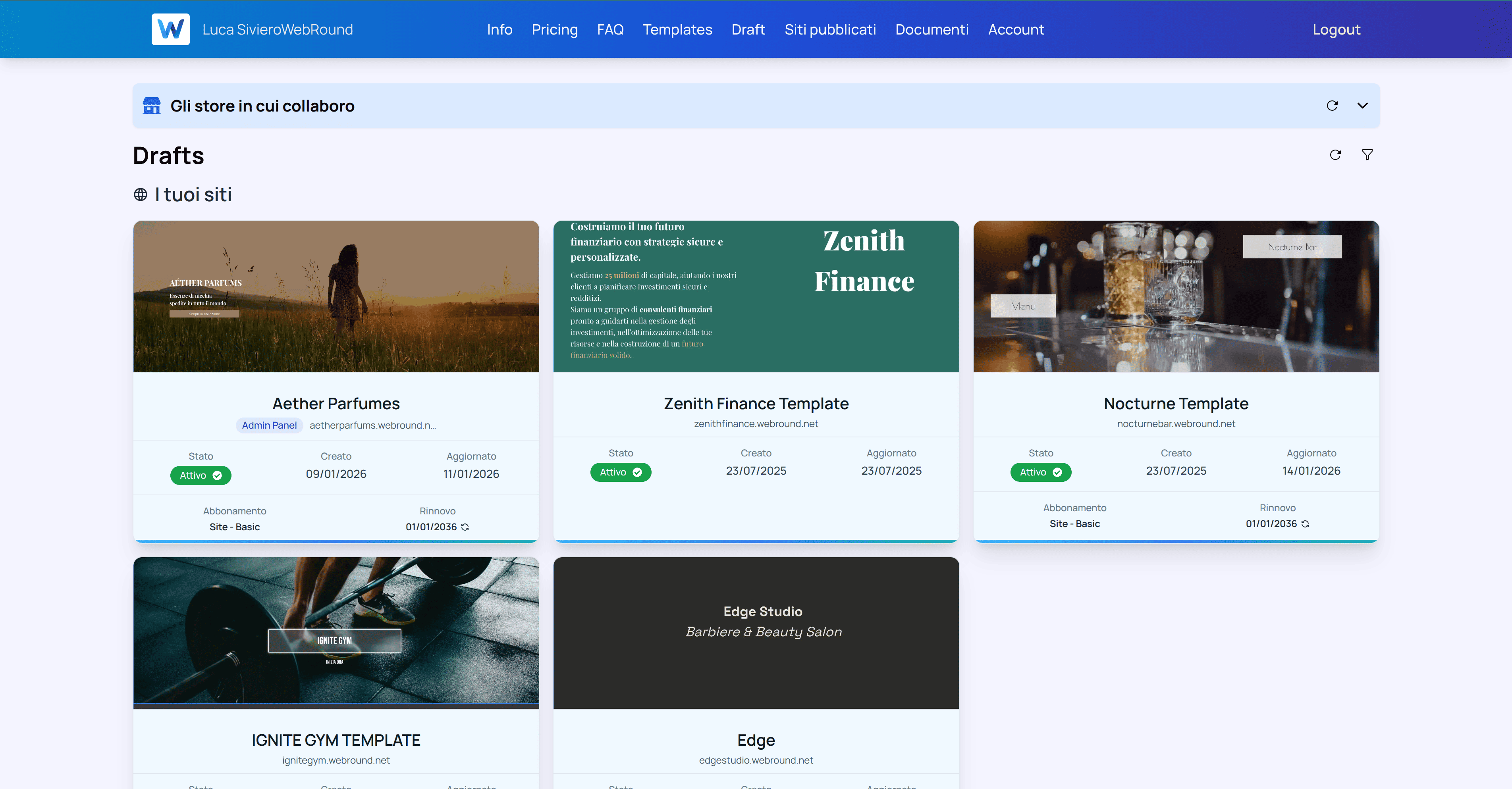
Go to your drafts page and choose the draft you want to link Stripe to. Each connection is independent of the others.
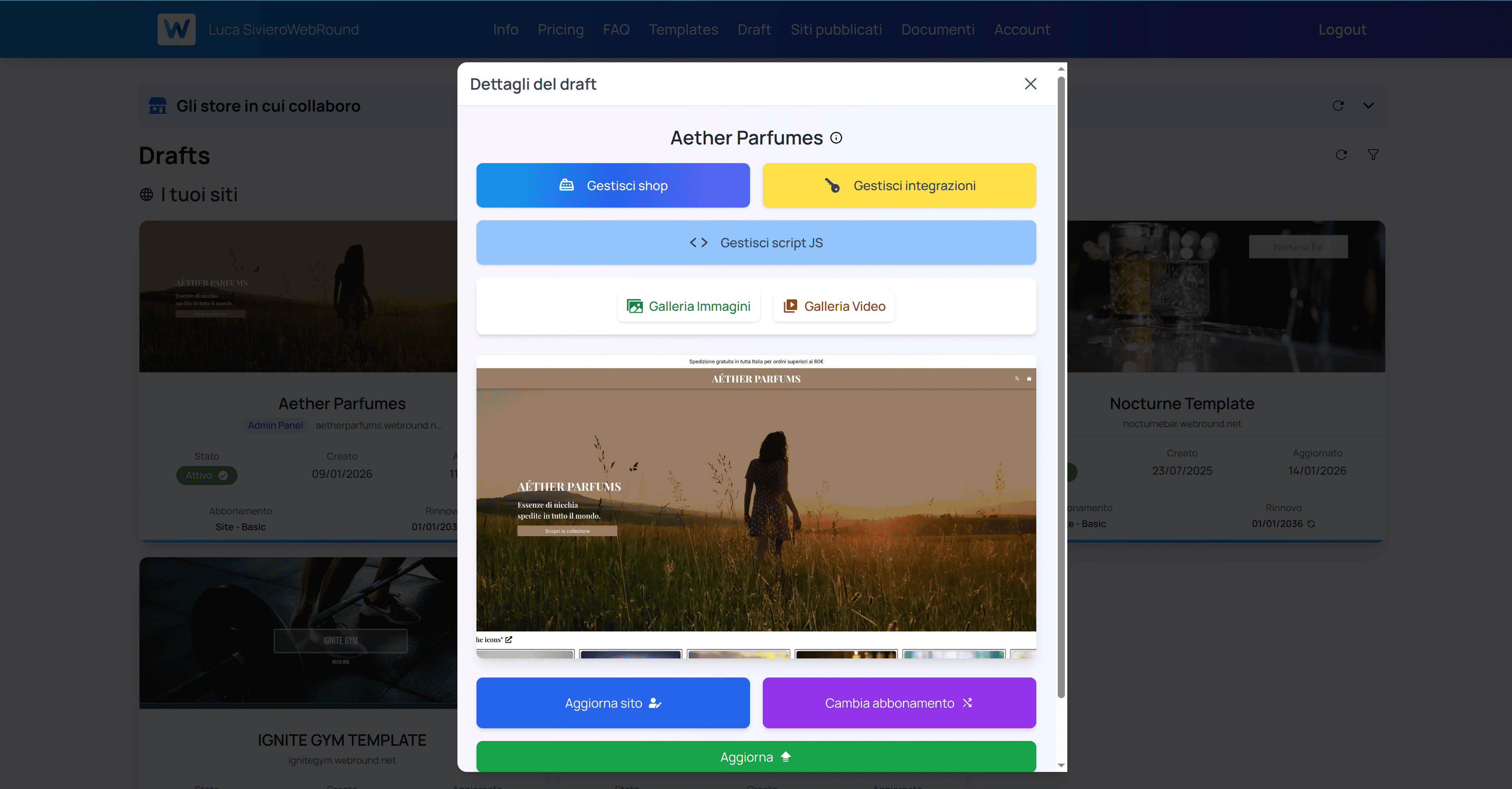
Click on the blue "Manage shop" button. If you haven't created a shop yet, the button will say "Create your shop".
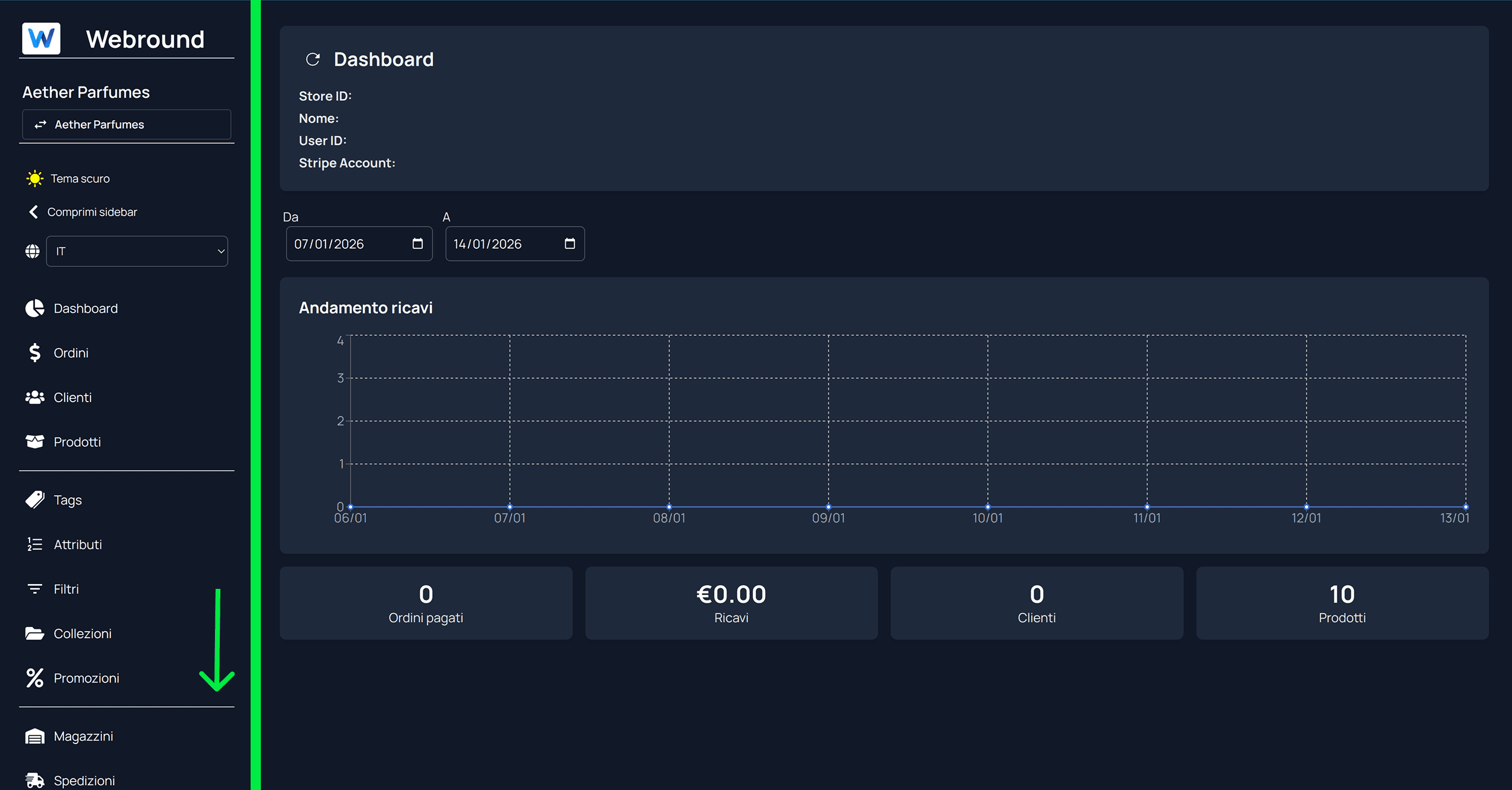
Go to your Webround Commerce home and scroll down in the side menu to find the "Stripe" entry.
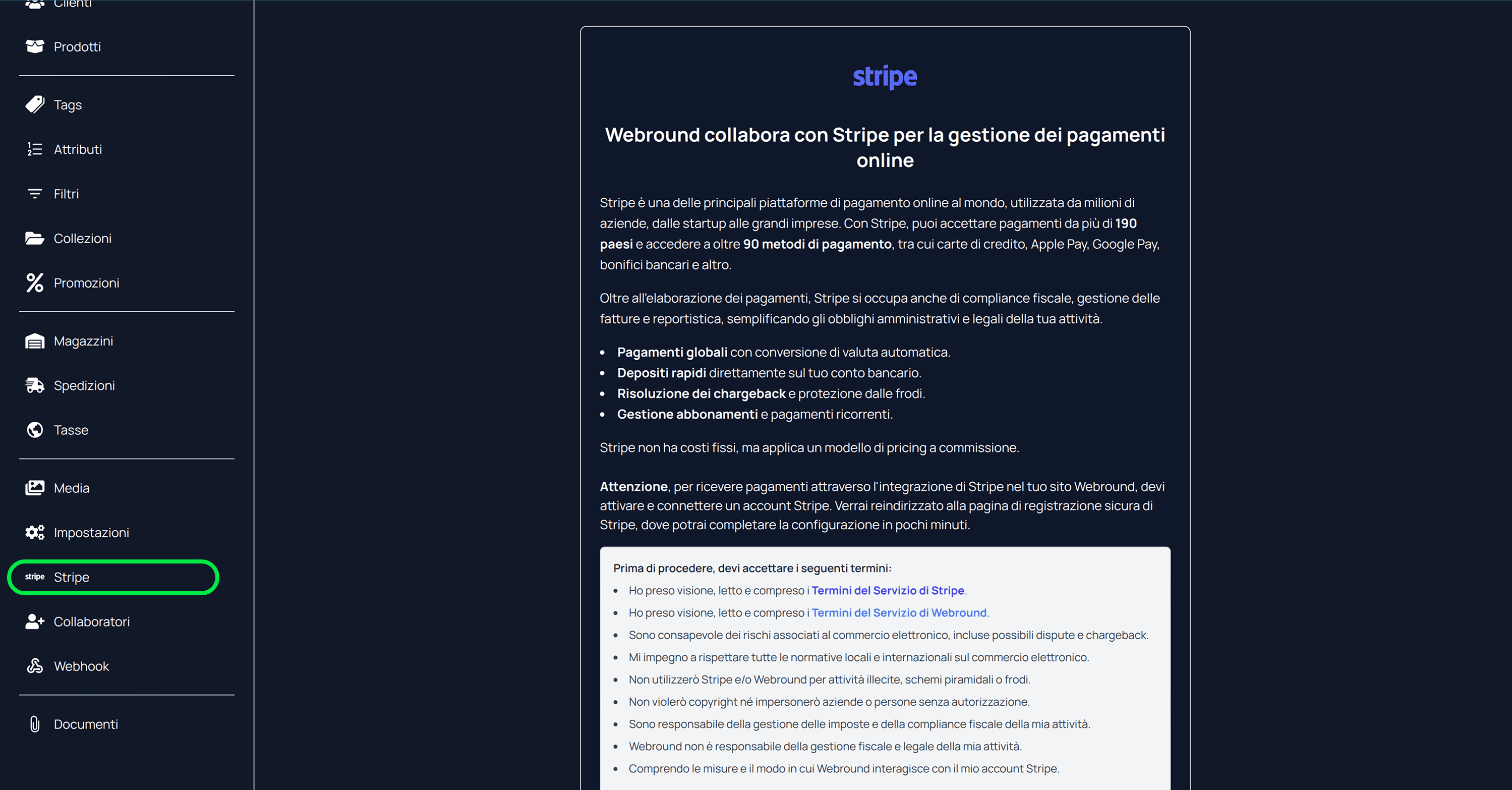
Click on the "Stripe" entry. If you haven't configured Stripe for your store yet, you will be presented with a terms and conditions page that you must read and understand. After that, you can proceed with connecting your Stripe account using the dedicated button.
What to do if you already have a Stripe account
The Webround integration allows you to link any Stripe account, whether new or existing. If your integration is successful, you will see metadata on this same page, which will allow you to understand what we know about your integration with Stripe. When a Stripe integration is successful, you will see a very precise report summarizing your preferences, such as checkout enablement, payout enablement (transfers from Stripe to your account), and other settings.
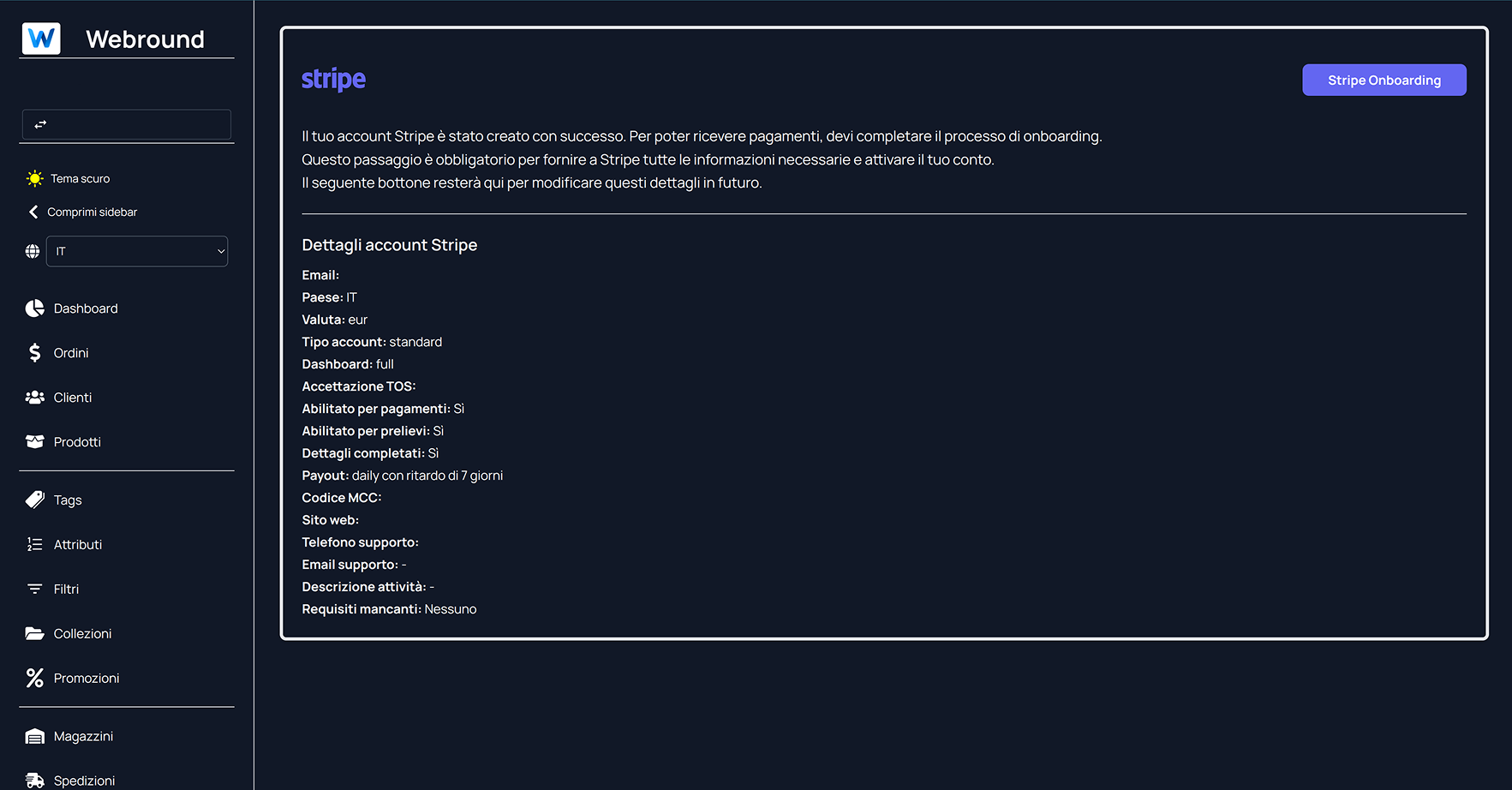
When your Stripe integration is complete and correct, it will look like this.
However, if you already had a Stripe account and completed all the steps, we might not receive an account update event on our platform. In that case, the details will not be updated in our systems, and your integration will appear incomplete.
You may encounter this behavior if you have already linked a Stripe account to Webround and choose to reuse the same account during the linking phase.
The solution is immediate: Click on the purple "Stripe Onboarding" button and log in. Even without saving any changes, exit the Stripe portal and return to Webround. At that point, you will have triggered a manual synchronization in our systems, which will recognize the latest status of your Stripe account shared with Webround.
What to do before launching an e-commerce
Before processing live orders, confirmation of a digital document attesting to the understanding of Stripe's terms of use is required.
By activating the integration, you declare you are aware of:
- The role and operations Stripe will perform on behalf of your fiscal identity.
- Your ability to legally sell the goods displayed in your Webround Commerce management system.
- Stripe's terms and limitations on goods for sale (prohibited or restricted products).
- The technical functioning of payment processing.
- Risks associated with online commerce and the ability to demonstrate the legitimacy of your operations.
- The obligation to report processed earnings to the relevant tax authorities.
- An understanding of Stripe and Webround fees.
Make sure your Stripe configuration on Webround clearly shows:
- Enabled for payments: Yes
- Enabled for payouts: Yes
- Details completed: Yes
- TOS Acceptance: Any valid date that does not report the year 1970
If these data do not comply with what is specified, your site's checkout will be blocked. This is a preventive measure to work effectively with Stripe and ensure that only accounts validated by Stripe are able to sell via Webround. To avoid blocks, we recommend providing Stripe with data about your natural person, your business, how you operate, and the type of service you offer to your e-commerce customers.
Operational Advice
- Catalog: Organize a clear and transparent offer.
- Security: Avoid integrating scripts or systems of doubtful origin to prevent data theft.
- Management: Prepare your staff for the operational management of orders and returns.
- Disputes: Study the functioning of disputes and chargebacks.
- Shipping: Configure correct shipping costs and prepare for national and international logistics.
- Taxes: Know the tax regulations of the destination countries (including the European OSS regulation).
- Contact: Clearly structure contact information on the site to manage customer support.
Webround wishes you the best for the launch of your business and reminds you:
- Webround will never ask for your Stripe password or access codes.
- Webround will not access your Stripe Dashboard unless strictly necessary.
- You can link Stripe to your Webround account only and exclusively from the site https://webround.com or https://www.webround.com. Any other page suggesting or communicating the possibility of performing this operation should be closed immediately and reported to Webround support at [email protected].
- Webround will not perform Stripe operations on your behalf outside of those communicated in the terms of use and in this documentation.
- Webround will not request your payment methods, bank account, PIN codes, or any type of personal information not strictly necessary for basic operations on the platform.
- Webround does not own your Stripe funds in any way and cannot in any way make transfers to your account. Anyone claiming to be able to unlock your Stripe funds or funds that Stripe holds following sales made with Webround should be reported immediately to Webround support.
- Webround will never ask for your credit card number, CVC, bank PIN, or password, unless you are purchasing a Webround subscription via the official Stripe checkout at https://webround.com or https://www.webround.com.
- Webround will never ask you to transfer funds to our systems or bank accounts, unless you are completing a purchase of a Webround subscription or service.
- Webround support will not contact you directly via phone to request personal or sensitive information regarding your Webround credentials, Stripe credentials, bank credentials, or any access credentials for third-party systems.
- Webround does not send communications, OTP codes, or credentials via SMS. Be wary of any SMS related to Webround. If you receive one, report it to support immediately.
Webround is in no way responsible for your tax compliance. How you structure the offer, the catalog, or the configuration of tax zones and shipping services is solely and exclusively your responsibility as the owner of the site created with Webround. Stripe does not natively manage tax compliance by reporting your invoices to tax authorities.
Natively, tax compliance, at least in Italy, primarily involves your management of sales and the related invoicing. After closing a sale with Stripe, make sure to export customer details and report the invoice to the Exchange System (Sistema di Interscambio) using a tool of your choice.